Desktop application · Runnable public demo
A small WPF app for machine-learning workflows.
I connected a Windows interface to Python data preparation and training, local ONNX inference, and an HTTP prediction service. This standalone demo makes the core integration code available to read and run.
C# / WPF · .NET 10 · Python · scikit-learn · ONNX Runtime · FastAPI. The data and bundled MLP are synthetic demonstrations, not validated fuel-cell predictions. The larger prediction workstation is a separate project.
View the public repository ↗Run it locallyRead the implementation
- My work
- Joined data conversion, training, evaluation and prediction in one WPF interface, with process output, cancellation and explicit model loading.
- Hard part
- Keep Python work off the UI thread, drain both output streams, and replace a model without disposing a session that is still in use.
- Working result
- Three operating tabs, a real 37-input / 4-output ONNX model, and an exercised local-to-HTTP fallback. The source is public; no account is needed to inspect it.
The actual desktop application
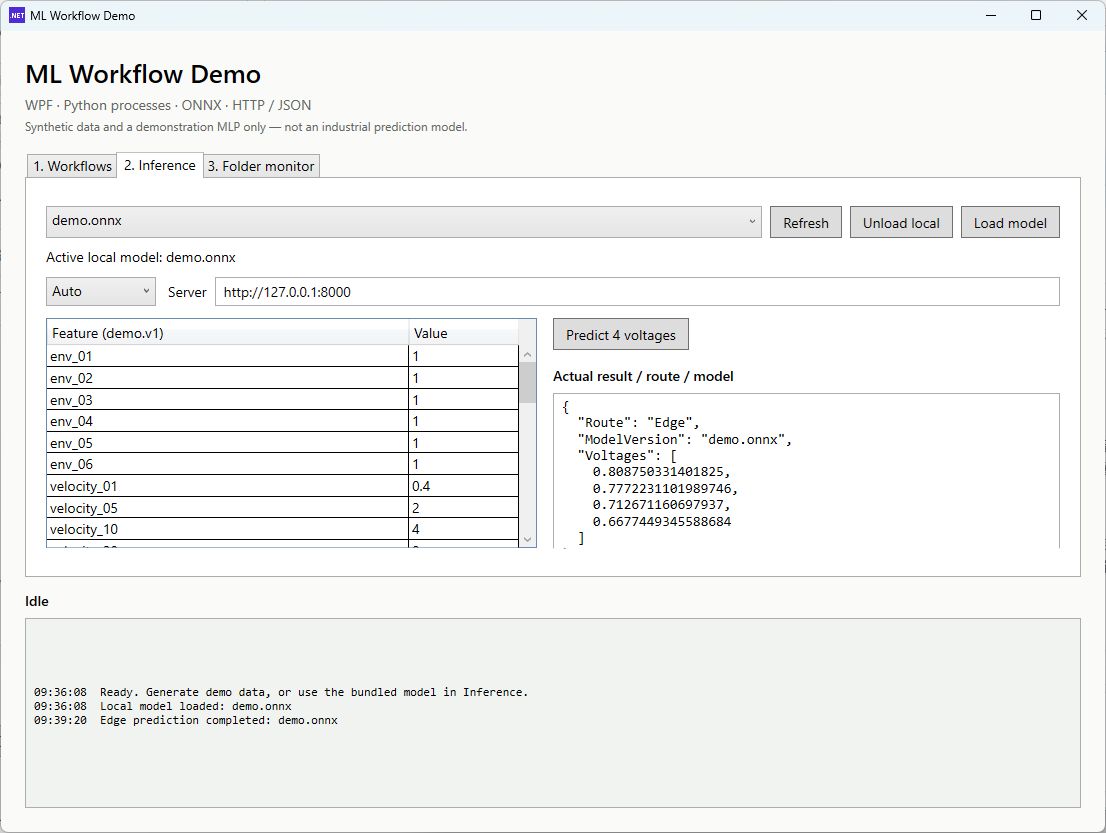
Route: Edge and ModelVersion: demo.onnx. These are synthetic-model predictions, not measured labels. Open the image for full-size text.The three tabs divide the job into Workflows, Inference, and Folder monitor. The log stays visible below them. This web page documents the Windows application; it does not run the model in your browser.
From a CSV to a prediction
- Prepare data in Workflows. Choose the Python executable and CSV path. Generate demo CSV creates 512 synthetic rows; Convert → JSONL and Preprocess → NPZ prepare a fixed training/evaluation split.
- Train a new model. Train → ONNX starts Python asynchronously. PID, progress, errors and the exit code appear in the log. Cancel Python job stops the child process tree. Evaluate MAE evaluates the selected ONNX file on the prepared holdout.
- Choose when to switch. Training adds a new filename to the model list; it leaves the active local session alone. In Inference, select the finished file and click Load model to activate it.
- Predict and inspect the context. Edit the 37-feature grid, select Auto, Edge or Cloud, then click Predict 4 voltages. Read the four values together with the actual route and model identity.
The bundled demo.onnx loads at startup, so a first local prediction does not require a training run. Selecting a filename is not the same as loading it: Edge uses the active local session; Cloud requests the selected filename from the server.
Where each operation runs
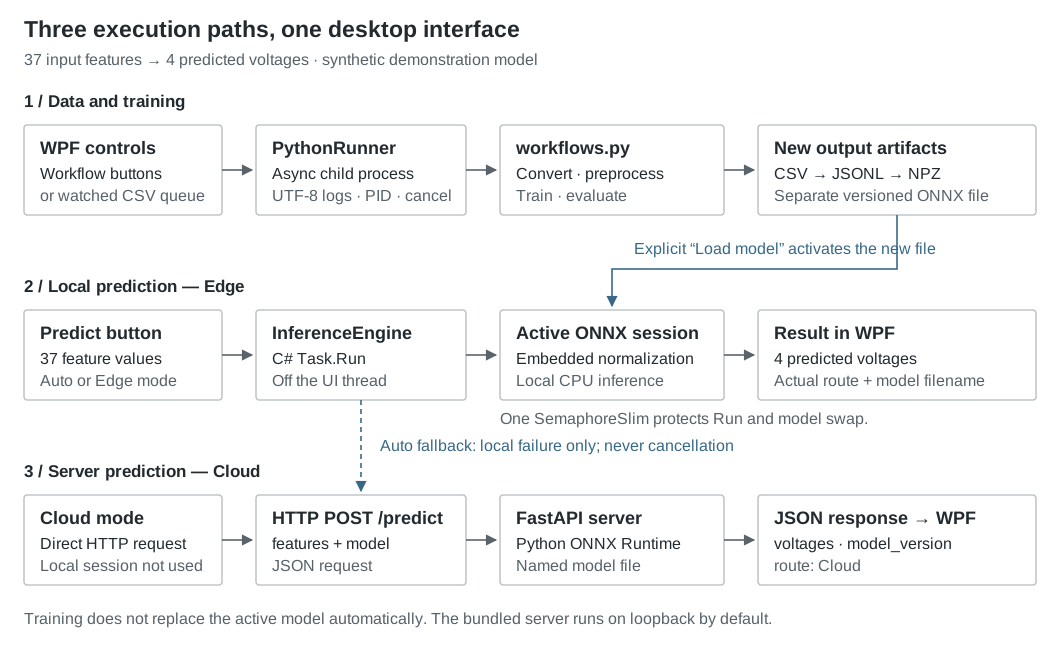
| Mode | Execution | On failure |
|---|---|---|
| Edge | Run the loaded ONNX session inside the C# application. | Report the error; do not call HTTP. |
| Cloud | Send JSON to the Python service. | Report the HTTP or service error. |
| Auto | Try the active local session first. | Try HTTP for a local failure or unavailable session. Cancellation never triggers fallback. |
A fallback you can observe
Start the included server, click Unload local, keep Auto selected, and predict. The log records the unavailable local session, the HTTP request, and its completion; the result reports Cloud. Click Load model to restore local inference. “Cloud” here can be the loopback service on the same computer.
What is behind the buttons
| Module | Implementation |
|---|---|
| UI and workflow state | Workflow_Click maps a button to a CLI action. StartJobAsync manages busy, success, failure and cancellation states. Python workflows are serialized; inference remains available. |
| Python process runner | Direct execution with ArgumentList, UTF-8 and unbuffered Python. Concurrent stdout/stderr reads avoid a blocked pipe; PID and exit codes expose the lifecycle. Cancellation kills the process tree. |
| Inference and model sessions | Task.Run moves synchronous ONNX calls off the UI thread. A shared SemaphoreSlim protects local inference and session replacement. HTTP uses HttpClient and typed JSON parsing. |
| Data, training and export | CSV → JSONL → NPZ; a small scikit-learn MLP; input/output scaling embedded in ONNX; evaluation through ONNX Runtime. |
| HTTP service | FastAPI validates the input, chooses an ONNX basename from models/, caches sessions by filename, and returns the four outputs plus model and route. |
The process boundary
Awaiting process exit, output streams and HTTP keeps waiting work separate from WPF's message loop. async alone does not put synchronous calculation on another thread. Log updates go through Dispatcher.BeginInvoke; UTF-8 handles encoding, while -u and flushing address buffered output.
The model boundary
A replacement session is created before taking the shared gate. If loading fails, the old session survives. If local inference is running, switching waits until it finishes before disposing the old session. This is a small, explicit critical section—not a lock-free swap or a production uptime guarantee.
New files trigger retraining, not an implicit model change
In Folder monitor, choose a directory and start watching it. A new CSV filename is queued, then converted, preprocessed and trained in order. Each run writes a new ONNX filename. Predictions keep using the current session until the user explicitly loads the new file.
New CSV → queue → convert → preprocess → train → new ONNX
                                                      ↓ explicit Load model
Predict → active local session                   replacement session
FileSystemWatcher handles Created and Renamed events. The queue runs one Python pipeline at a time and suppresses duplicate paths while queued or processing. Add a completed CSV, or finish writing a .tmp file before renaming it to .csv; the one-second delay is not a transfer-completion guarantee.
Each new CSV trains its own model from scratch. The demo does not accumulate historical files, continue old weights, watch edits to existing CSVs, or restore its in-memory queue after restart. “Background retraining” describes this behavior more accurately than online incremental learning.
A deliberately small model contract
demo.v1 orders six environment features, thirteen velocity percentiles, thirteen slope percentiles, time, and four initial voltages. The model is a 37 → 32 ReLU → 4 MLP. Input scaling and output inverse scaling live in the exported graph, so both C# and Python pass values in their original units.
ONNX input:   features  float32 [N, 37]
ONNX output:  voltages  float32 [N, 4]

POST /predict
  request:   features (37 numbers), model (ONNX filename)
  response:  voltages (4 numbers), model_version, route
GET /health
  response:  service status
The model predicts the four values directly. It is not the private PGVD artifact: its tensors, learned function and evidence are different. Read the exact feature order and interface contract.
Run the demo locally
Use Windows, the .NET 10 SDK, and Python 3.11 or later. From PowerShell:
git clone https://github.com/shengtokyonokouu-cpu/wpf-python-ml-demo.git
cd wpf-python-ml-demo
python -m venv .venv
.\.venv\Scripts\python.exe -m pip install -r python/requirements.txt
dotnet run --project desktop/MlWorkflowDemo.csproj
For HTTP inference, start the server in a second terminal from the same checkout:
.\.venv\Scripts\python.exe -u python/server.py
# Endpoint in the app: http://127.0.0.1:8000
The server and desktop then share the checkout's models/ directory. A separate machine would need its own copy of the selected model. Installation needs package access; local training and Edge inference do not call an online model API. Full setup and CLI examples.
What was checked, and what this leaves out
Basic local checks on used the real synthetic model:
| Check | Observed result | Scope |
|---|---|---|
| Release build | Zero errors and zero warnings. | The .NET 10 desktop project compiled. |
| Local prediction | The C# ONNX session returned four values and the actual Edge/model identity. | A real local inference call, not an accuracy benchmark. |
| Auto fallback | After unloading the local session, a real HTTP call returned the same fixture's four values with route Cloud. | The request/response fallback worked on loopback, not a remote deployment or recovery test. |
This version keeps the integration readable. It has no additional benchmark suite, authentication, persistent jobs, automatic candidate-quality gate, or production deployment system. Native ONNX cancellation is checked before and after Run, not used to interrupt an operator midway.
Curves, inverse search, MATLAB, Launcher, updates and Copilot belong to the larger system, not this demo. Real simulation data, PGVD weights and MATLAB internals remain excluded. Synthetic holdout MAE is only an application feature here; it is not evidence for industrial accuracy or long-horizon reliability.
